
Your Route to Out-of-Home at Checkout, Step by Step
Adding checkout delivery options, also known as out-of-home (OOH) delivery, click and collect, or PUDO, lets shoppers collect from a locker or pickup point instead of home delivery. It cuts failed deliveries and shipping costs, and converts more shoppers who’d rather skip waiting in for a delivery.
HubBox connects checkout delivery options to your platform, through your existing carrier network, live in a few weeks with zero risk to your existing checkout.
See your route to launch in a few steps.
Your route to adding checkout delivery options, step by step
-
1Plan
Pick your platform
HubBox connects to your store through a ready-made plugin, our JavaScript SDK, or a no-code Google Tag Manager tag, whichever fits how your site is built.
 ShopifyPlugin
 BigCommercePlugin
 MagentoPlugin
 WooCommercePlugin
 SalesforcePlugin
- Custom / headless (SDK)Full control
Plugins are the quickest route live, since most of the work is already built for you. Your Integrations Manager confirms exact timelines once we know your setup.
-
2Plan
Choose your carrier(s)
Go with a single carrier, or run multicarrier if that fits your business, HubBox brings them together in one checkout experience.
Single carrier MulticarrierShip with one carrier? We plug straight into your existing account, no new courier relationship to set up.
Running several carriers? HubBox merges every network into a single map at checkout, and can route customers to the nearest or best-value option automatically.
A dedicated HubBox Integrations Manager works with you upfront to scope which carriers make sense for your business, and how they should appear to your customers at checkout.
-
3Build
Design & configure your setup
Together, we design how pickup appears among your checkout delivery options, map view or list, branding, messaging, so it feels like a natural part of your checkout, not a bolt-on.
Behind the scenes, we connect to your OMS, ERP and WMS, so the moment a customer picks a location, orders flow through exactly as they do today, no changes to your systems. A compliant shipping label is generated automatically with your carrier, no manual re-keying.
-
4Test
Test in your sandbox, then go live
Everything is built and tested in a fully isolated HubBox sandbox before it ever touches your live site, so there’s zero risk to your real checkout while you get comfortable with it.
Once you’re happy, going live follows your normal deployment process, with the HubBox team on standby to support the switch.
-
5Live
Live at checkout
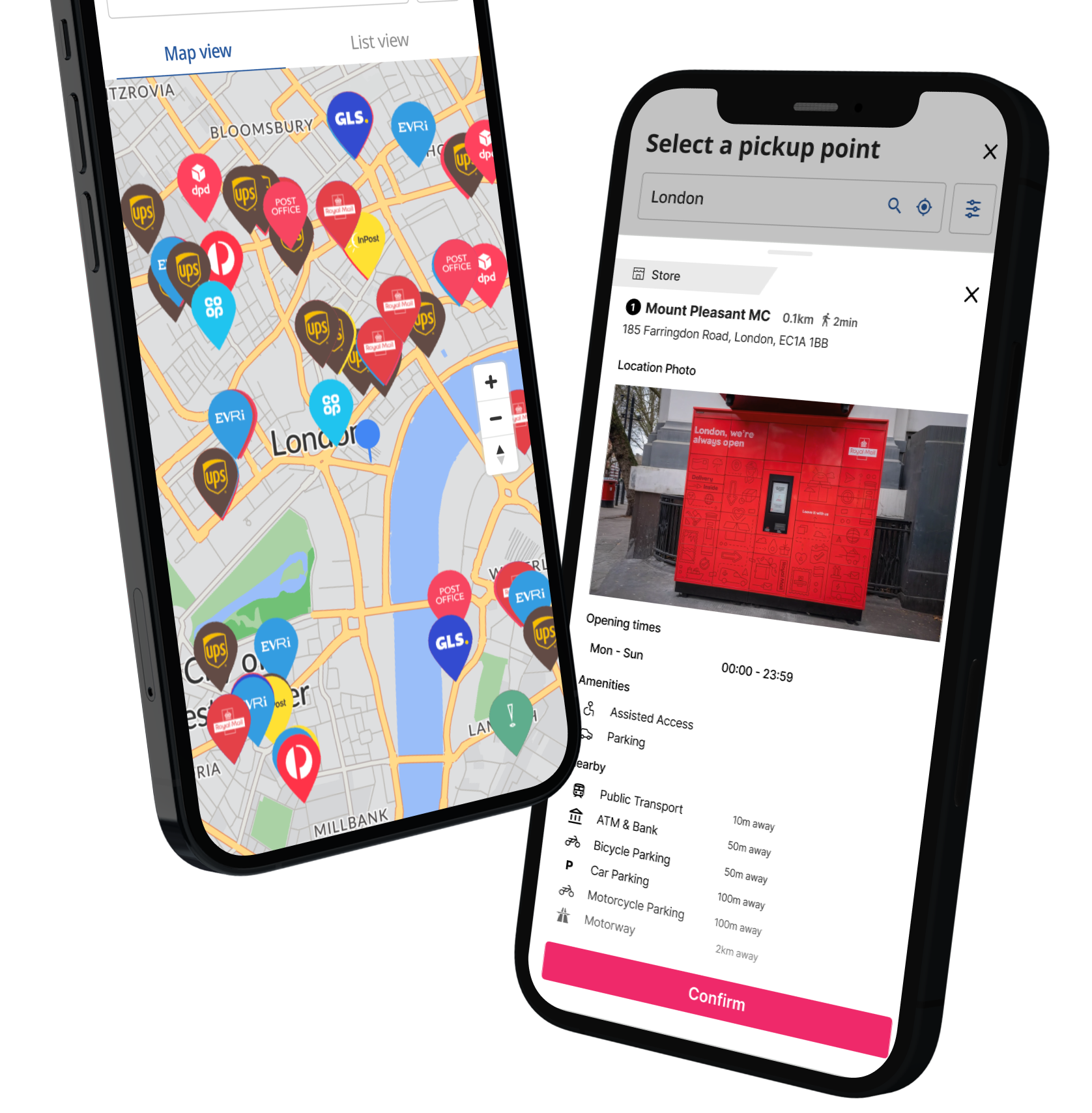
Customers see pickup as an option at checkout, with a branded map showing only the locations available where you ship, branded pins, live opening hours and location details.
-
6Beyond
Ongoing support & optimization
From day one live, a dedicated Client Success Manager helps you track pickup adoption, conversion impact and customer satisfaction, and works with you to keep improving results.
HubBox also gives you ready-made marketing toolkits to help promote the new pickup option to your customers from launch day.
Retailers who’ve made the same journey
A few of the results retailers see once pickup goes live at checkout.

Fewer failed deliveries and 5% saved on shipping, with 15% of orders now going to pickup.

DPD Pickup added at checkout, giving golfers more delivery choice ahead of peak trading.

Secure click and collect for high-value jewellery and watch orders, with fewer missed deliveries.
Questions about the journey
How long does integration usually take?
It depends on your platform and setup. Plugin integrations (Shopify, BigCommerce, Magento, WooCommerce, Salesforce) are the fastest route live, since most of the work is already built. Custom or headless builds via the SDK take longer, as they’re scoped around your specific stack. Your Integrations Manager confirms an exact timeline once we know your platform and carriers.
Do we need a new relationship with a carrier?
No. If you’re shipping with a carrier already, HubBox plugs into your existing account. There’s no new courier relationship required, whether you’re running a single carrier or multicarrier.
Is there any risk to our live checkout while we build?
No. Everything is built and tested in a fully isolated HubBox sandbox first, so there’s zero risk to your real checkout. Going live only happens once you’re happy, following your normal deployment process.
What support do we get once we’re live?
A dedicated Client Success Manager helps you track pickup adoption, conversion impact and customer satisfaction from day one, and works with you to keep improving results. You’ll also get ready-made marketing toolkits to promote pickup to your customers from launch.
What’s the difference between click and collect and out-of-home (OOH) delivery?
Click and collect usually means picking up from your own store. Out-of-home delivery is broader: it includes third-party pickup points, parcel lockers, and parcelshops run by carriers like DPD, Royal Mail, UPS, InPost, Evri, GLS, Hermes, and DHL. HubBox covers both, giving shoppers a single map of every available option at checkout, not just your own stores.
Does this work if we ship internationally or across multiple countries?
Yes. HubBox is carrier-agnostic and works across the pickup networks available in each country you ship to, so multi-country retailers get one integration that surfaces the right local checkout delivery options wherever a shopper is checking out.
Will adding checkout delivery options slow down our page speed or conversion?
No. The pickup map and location search are built to load asynchronously into your existing checkout flow, so there’s no meaningful impact on load time. Most retailers see the opposite effect: checkout delivery options tend to lift conversion and average order value by giving shoppers a cheaper, faster fulfilment option.
What if we use a custom or headless checkout, not one of the listed platforms?
Our JavaScript SDK is built for exactly this. It gives you full control over how and where the pickup map appears, so custom-built and headless checkouts get the same functionality as a plugin integration. See our developer portal for the technical detail.
How much does it cost to add checkout delivery options with HubBox?
Pricing depends on your platform, carrier setup, and order volume. Most HubBox premium carrier partners fund the first year for eligible retailers, so you can see the impact on conversion before committing spend. Speak to the team for a quote based on your setup.
Ready to map out your own journey?
Tell us your platform and carriers, and the team will show you exactly what step one looks like for your store.
Want the full technical detail? Visit our developer portal for the complete integration journey.